

Introduction
Current websites are far beyond typical designs with static pages, simple transitions, and conventional interfaces. Brands are in search of digital experiences that integrate narration, animation, interactivity of visuals, and flawless performance at the same time.
To create these experiences, you need to implement many technologies at once. A great combination of these technologies is Next.js + GSAP + Three.js.
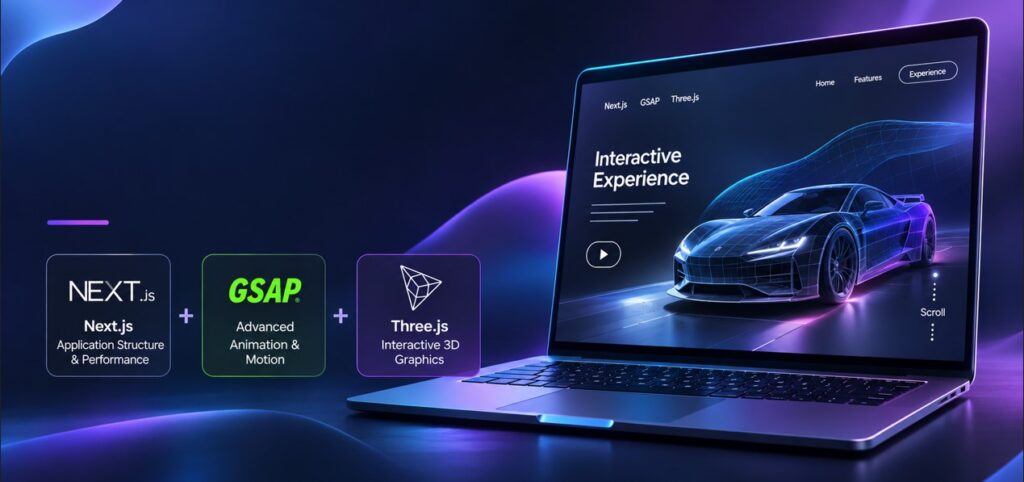
Each of these technologies serves its own purpose. Next.js structures the application and decides how to render it, GSAP creates fascinating animations, and Three.js provides ability to make 3D graphics rendered in the browser interactively.
Using these technologies together in the right way opens the way to making a regular website into an engaging digital tool without making it too complicated from the technical point of view.
What Does Next.js Do?
Next.js is a React-based framework which is utilised for creating contemporary websites and online applications. It presents an organised development framework, which comprises of different important functions including those implemented in rendering, routing, data processing, and boosting performance.
Instead of spending time building every feature of each application from scratch, software developers can use Next.js in order to effectively create the basic infrastructure of their engaging website.
Next.js can manage:
- Routing: Organize pages and navigation across a website.
- Rendering: Support server-side rendering, static rendering, and other rendering strategies.
- Application Structure: Organize reusable components and layouts.
- Data Fetching: Retrieve and manage information required by pages and components.
- Asset Optimization: Optimize images, fonts, and other resources.
- Server Logic: Support server-side functionality and application logic.
For interactive websites, Next.js provides the foundation on which animation systems and 3D experiences can be integrated.
What Does GSAP Do?
The GreenSock Animation Platform (GSAP) is a library written in JavaScript that is useful for producing accurate and powerful animations.
Using GSAP, developers can create animations for a wide range of objects, including icons, images, buttons, HTML elements, text, and similar visuals.
GSAP can control:
- Position: Move elements across the screen.
- Scale: Expand or shrink visual elements.
- Rotation: Rotate objects and interface components.
- Opacity: Create smooth fade-in and fade-out effects.
- Timelines: Coordinate multiple animations in a sequence.
- SVG: Animate vector graphics and paths.
- Text: Create dynamic text transitions and reveal effects.
How ScrollTrigger Extends GSAP
GSAP’s ScrollTrigger plugin allows developers to connect animations with scrolling behavior.
It supports:
- Scroll-based animation triggers
- Animation scrubbing
- Pinning elements
- Start and end positions
- Scroll-based timelines
- Responsive animation controls
For example, an element can remain pinned while the visitor scrolls through a section, with its animation progressing according to the scroll position.
This makes GSAP particularly useful for storytelling websites, interactive product pages, and long-form visual experiences.
What Does Three.js Do?
Three.js is a JavaScript library that makes it easier to create and display 3D graphics in a browser using WebGL and related rendering technologies.
It provides the tools needed to build interactive 3D scenes without manually managing every low-level rendering operation.
Developers can create:
- Cameras: Control how users view a 3D scene.
- Lights: Add lighting, shadows, and visual depth.
- 3D Objects: Create models, shapes, and environments.
- Materials: Define surface appearance and visual properties.
- Animation: Animate objects, camera movements, and scene elements.
- Interactive Scenes: Allow users to rotate, explore, and interact with 3D content.
Three.js is particularly useful when a website needs visual experiences that go beyond traditional HTML and CSS layouts.
How Next.js, GSAP, and Three.js Work Together
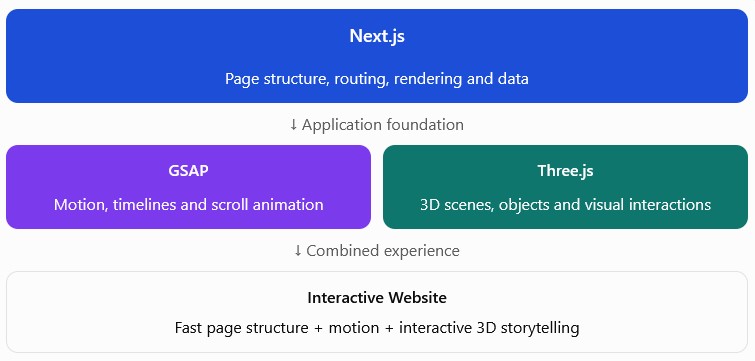
The real strength of this stack comes from how the three technologies complement each other rather than overlap.
Each technology handles a specific responsibility, allowing developers to build complex experiences with a more organized architecture.
Imagine a vehicle launch website.
- Next.js: Next.js loads the page structure, product information, images, navigation, and supporting content.
- Three.js: Three.js displays an interactive 3D vehicle that visitors can explore or view from different angles.
- GSAP: GSAP controls the animation sequences, including visual transitions, object movements, and the timing of elements appearing on the screen.
ScrollTrigger
ScrollTrigger connects these animations to the visitor’s scrolling behavior.
As the visitor scrolls, the vehicle rotates, the camera changes position, and product features appear at specific moments. Instead of displaying separate content blocks, the website creates a unified product story.
Do You Need All Three Technologies?
Not every interactive website requires Next.js, GSAP, and Three.js simultaneously. The right technology stack depends on the project’s requirements, complexity, performance goals, and user experience.
When to Use GSAP Without Three.js
GSAP is often sufficient when a website requires advanced 2D animation, smooth transitions, scroll-based effects, animated typography, or interactive UI elements without 3D graphics.
When Three.js Makes Sense
Three.js becomes valuable when the website requires interactive 3D models, immersive visual environments, product exploration, complex visual storytelling, or real-time 3D experiences.
When Simpler CSS Animations Are Better
For simple hover effects, transitions, fades, or basic movement, CSS animations may be more appropriate. Using additional JavaScript libraries for simple interactions can unnecessarily increase complexity.
The best approach is to choose technologies based on the experience you want to create rather than adding libraries simply because they are available.
Best Use Cases for Next.js + GSAP + Three.js
This technology combination is particularly suited for websites where visual storytelling, interactive experiences, and dynamic presentation are important.
1. Product Launch Websites
Showcase new products with interactive models, animated feature sections, cinematic transitions, and immersive product storytelling.
2. Technology Websites
Technology brands can use 3D graphics, animation, and interactive visualizations to explain complex products, software, and technical solutions.
3. Automotive Websites
Create interactive vehicle showcases with rotating models, animated specifications, scrolling transitions, and immersive product exploration.
4. Creative Portfolios
Design portfolios can use scroll-driven animation, 3D environments, and creative transitions to showcase projects in memorable ways.
5. Architecture Websites
Architectural projects can benefit from interactive building models, virtual environments, visual transitions, and immersive project presentations.
6. Luxury Brand Websites
Luxury brands can use subtle animation, cinematic storytelling, and interactive visuals to create distinctive digital experiences.
7. Entertainment Websites
Entertainment brands, gaming projects, and media experiences can use 3D scenes and motion-driven storytelling to create more engaging interfaces.
8. SaaS Storytelling Websites
SaaS companies can use animation and interactive visualizations to explain product workflows, features, dashboards, and complex processes.
Performance Considerations When Using Next.js, GSAP, and Three.js
Utilizing different kinds of animation and rendering technologies can allow for the development of wonderful websites, however, performance must still remain on the forefront of development.
Interactive experiences can be quite heavy on resources if developments such as animations, 3D models, textures and scripts are not handled effectively.
1. Use Dynamic Imports
Load 3D components only when they are needed. Dynamic imports and appropriate loading strategies can help avoid loading heavy interactive components unnecessarily.
2. Lazy Load 3D Experiences
Avoid loading every 3D scene immediately. Load scenes when visitors approach the relevant section or when the experience is ready to be displayed.
3. Optimize Textures
Large textures can consume significant memory and affect rendering performance. Compress textures, use appropriate dimensions, and avoid unnecessarily detailed assets.
4. Reduce Geometry Complexity
3D models with excessive polygons can increase rendering costs. Optimize geometry and use appropriate levels of detail to maintain smooth performance.
5. Manage Memory Cleanup
Dispose of unnecessary geometries, materials, textures, and other resources when 3D components are no longer in use to prevent memory-related performance issues.
6. Optimize Animation Efficiency
Use efficient animation techniques, avoid unnecessary updates, and keep animation workloads manageable, especially on mobile devices and lower-powered hardware.
7. Create Mobile Fallbacks
Not every device can handle complex 3D experiences equally well. Consider simplified animations, static visuals, or alternative interactions for mobile and lower-performance devices.
8. Test Real-World Performance
Try out the experience on different browsers, devices, screen sizes, and networks. Performance must be tested under realistic user conditions and not just on powerful developer machines.
It is not a requirement to showcase all technologies at once. The aim is to develop the most simplistic architecture to deliver the desired experience.
A Practical Development Workflow
Building an interactive website with this stack becomes easier when development is divided into clear stages.
Step 1: Define the Experience
Identify the website’s goals, audience, visual direction, interactions, and performance requirements before selecting animation techniques.
Step 2: Build the Foundation with Next.js
Create the page structure, routes, reusable components, content, and foundational application architecture.
Step 3: Implement the 3D Scene
Use Three.js to create the required scene, objects, materials, camera, lighting, and user interactions.
Step 4: Add Animation with GSAP
Build animation timelines, transitions, element reveals, and movement sequences that complement the website’s content.
Step 5: Connect ScrollTrigger
Connect selected animation sequences to scrolling behavior to create coordinated storytelling and visual transitions.
Step 6: Optimize the Experience
Optimize assets, loading strategies, animation behavior, responsiveness, and memory usage.
Step 7: Test and Refine
Test the complete experience across devices and browsers, refine interactions, and make adjustments based on usability and performance.
How Netleon Can Help Build Interactive Web Experiences
Modern websites increasingly require a combination of development expertise, performance optimization, creative design, and interactive technologies. Netleon helps businesses build digital experiences that align with their brand identity, technical requirements, and business objectives.
Our Enterprise Software Development expertise supports the development of modern, scalable, and custom digital solutions that combine functionality with thoughtfully designed user experiences.
From interactive product websites and animated digital experiences to complex web applications, the right development approach helps businesses create websites that are engaging, functional, and scalable.
Final Thoughts
Next.js, GSAP, and Three.js provide powerful building blocks for modern interactive website development. Next.js establishes the application foundation, GSAP enables sophisticated motion and scroll-based animation, and Three.js brings interactive 3D graphics into the browser.
When combined thoughtfully, these technologies allow development teams to create experiences that blend conventional web content with cinematic motion, interactive visuals, and real-time graphics.
However, the success of an interactive website depends on more than the technology stack. Performance, accessibility, usability, responsive design, and the purpose behind every interaction remain equally important. Netleon can use this type of stack for brands that need more than a conventional corporate website and want their digital presence to become part of the product experience itself.
FAQs
1. What Is Next.js + GSAP + Three.js?
It is a set of technologies used to create interactive websites. Next.js deals with the application structure, GSAP deals with animations, and Three.js provides interactive 3D graphics.
2. Are GSAP and Three.js Compatible?
Yes. GSAP can animate Three.js objects, camera parameters, materials, and any other components of the scene allowing you to create 3D animation and transition effects.
3. Is Next.js Needed for Three.js Websites?
No. Three.js can be used with some other frameworks or just with plain JS. Next.js may come in handy in case your website requires routing, application structuring, rendering and so on.
4. Is Three.js Suitable for Interactive Websites?
Yes. Three.js is needed when you need interactive 3D objects on your website.